

Watch the video walkthrough with transcript
To add an external collaborator, open your business in ChatGPT Business Hub, click Invite, enter their ChatGPT account email, and select the matching person.
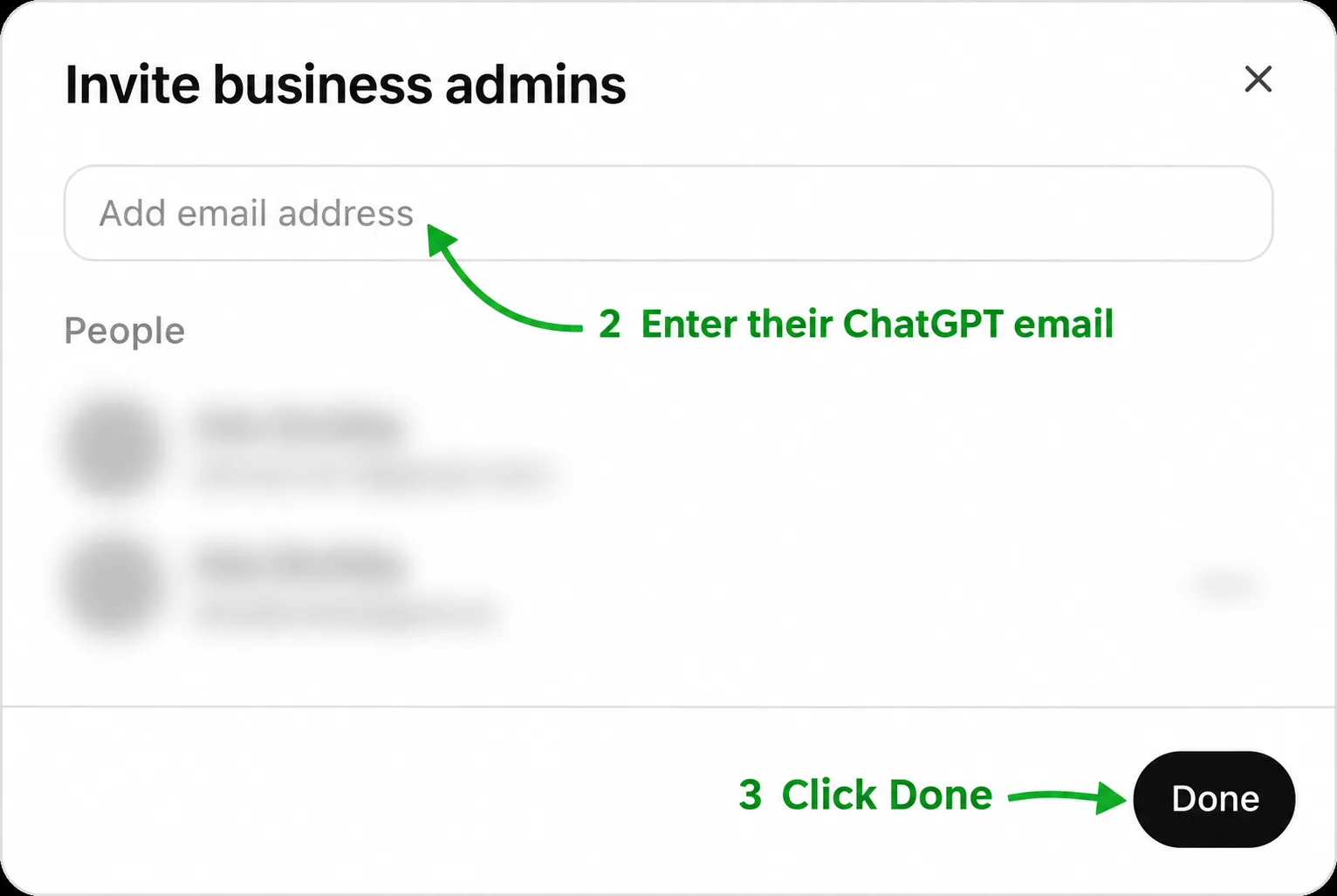
This flow is labeled Invite business admins. Use it for someone you trust to help manage the business.
Step 1: Open your business and click Invite
Open Business Hub and select the business you want to share. Click Invite in the upper-right corner.

Step 2: Enter their ChatGPT email address
In the Invite business admins window, click Add email address and enter the email associated with the person’s existing ChatGPT account.
Ask them to confirm which email they use before you add them.
Step 3: Select the person and check the People list
When the matching account appears, select it to add the person. Check the People list to confirm the account is listed, then click Done.
If you cannot add them
If a verification prompt blocks you, complete the requested verification first and return to Invite. See how to check whether your business is verified.
If the business was claimed inside a ChatGPT workspace, the invitee may need to belong to that workspace. Contact OpenAI Support if an agency invitation is blocked. Each person should use their own account; do not share a personal claim link (OpenAI Help Center).
Sources
- OpenAI Help Center: Setting up your business on ChatGPT, section on teammate and agency access.
Screenshots and invite steps reflect the Business Hub walkthrough from November 10, 2026. Business and personal details are obscured.

